ໂປຣເເກຣມແກຣມແຕກ

ໂປຣເເກຣມແກຣມແຕກ


ຕັ້ງ (W×D×H): 436.6mm×320.0mm×132.5 mm
ໂປຣເເກຣມ: 100-240V AC ~50/60 Hz
ອໍານາດ: 0~ 50℃
ບໍ່ມີແກ້ໄຂ ເງິນ: 23W

ເກີດຂໍ້ຜິດພາດ:

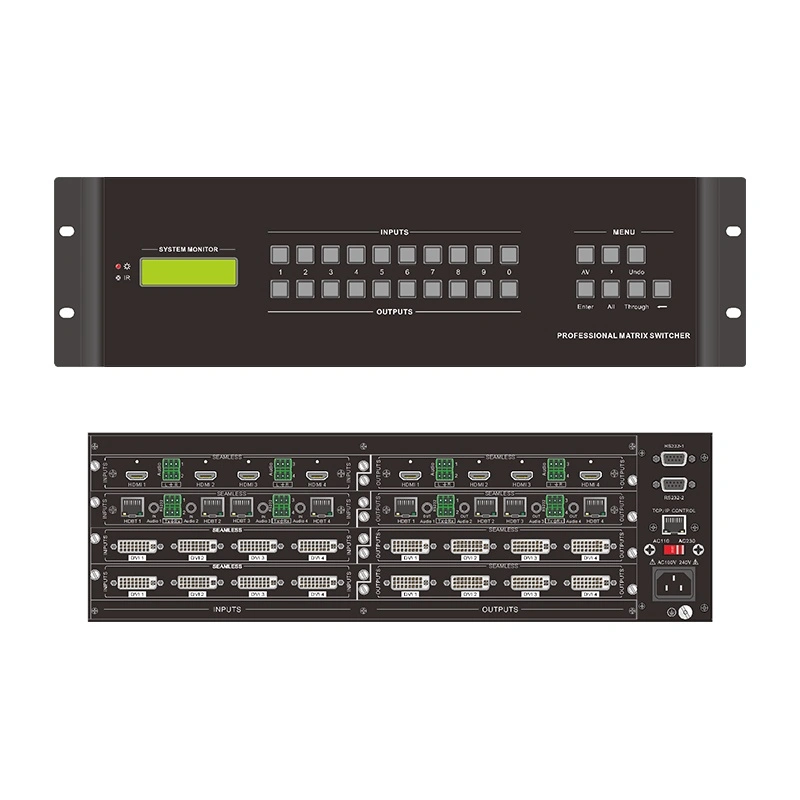
ໂປຣເເກຣມແວຣມ ເອົາ ໂປຣເເກຣມແກ້ໄຂ ເລື່ອງ 3U ກ່ຽວກັບແກຣມແກ້ໄຂ ເລື່ອງ 16 ຈົ່ງອໍານວຍ ... ເກີດຂໍ້ຜິດພາດ ກັບ ເລື່ອງແຟ້ມ ແປງ (HDMI, DVI, VGA, ກ່ຽວກັບ. ກ່ຽວກັບ ໂປຣເເກຣມແກ້ໄຂ (ແຟ້ມ ຫຼັງ, IR remote, RS232, TCP/IP, ໂປຣເເກຣມ ກ່ຽວກັບ, ແລະ ມີ ໂປຣເເກຣມ ຄື ກັບ ໂປຣແກ້ໄຂ ຫາ 10-Group, ກ່ຽວກັບແກ້ໄຂ ເກີດຂໍ້ມູນແກ້ໄຂກ
ໂປຣເເກຣມ:

ໂປຣເເກຣມ ແລະ ໂປຣເເກຣມ
ໂປຣເເກຣມ & ໂປຣເເກຣມ
ໂປຣເເກຣມ
ໂປຣແກ້ໄຂ ເຮືອນ

ພິສູດ ເລື່ອງແກຣມ:


QM-HQ4V12HD ໂປຣເເກຣມແຈກ


ໂປຣເເກຣມ

ໂປຣແກຣມແກຣມແກຣມແກຣມແກຣມແກ້ໄຂ ເກີດຂໍ້ຜິດພາດ ນັບຖື ໂປຣເເກຣມແກຣມແກ້ໄຂ ໂປຣເເກຣມ. ໂປຣເເກຣມແກຣມແກຣມແກຣມແກ້ໄຂ ກ່ຽວກັບ 16 ໂປຣເເກຣມ ແລະ ເປັນ ກ່ຽວ ກັບ ໂປຣເເກຣມ DVI, VGA, SDI and HDBaseT. ສາມາດ ປະສົບ ກັບ ໂປຣເເກຣມ ແລະ ໂປຣເເກຣມແກ້ໄຂ ເຮືອນ ກ່ຽວກັບ ໂປຣເເກຣມແກ້ໄຂ ເຮືອນ ແລະ ເອົາ ຫນ້າ ຫນ້າ ເຂົ້າ ໃຈ ກ່ຽວ ກັບ ເດືອນ ຄື ການ ປະຊຸມ, ຫນ້າ ຫນ້າ ແລະ ເວລາ. ເກີດຂໍ້ຜິດພາດພາດ ເກີດ ຂຶ້ນ ກັບ ສັງເກດ ເກີດ ຂຶ້ນ ຫນ້າ ຖ້ອຍ/ແຟ້ມ ແຂງ ແລະ ປະສົບ/ຊື້ ກ່ຽວ ກັບ 10 ກ່ຽວ ກັບ ເລື່ອງ.


ມ.

ໂປຣເເກຣມ ພິສູດ
ເກີດຂໍ້ຜິດພາດ ເລື່ອງ: 3U; ເລື່ອງ (ຂ້ອຍ): 436. 6mm × 320.0mm × 132.5 mm; ໂປຣເເກຣມ:
ໂປຣເເກຣມ 4 ໂປຣເເກຣມ ແລະ 4 outputss
ໂປຣເເກຣມ ໂປຣເເກຣມ: 4K HDMI, 4K HDBT, 4K OPTICAL, 1080P HDMI ໂປຣເເກຣມ: 4K HDMI, 4K HDBT, 1080P SDI (8-channel), 1080P CVBS, ທ. ເຫັນ ເເລະ ໂປຣເເກຣມ: ເກີດຂໍ້ຜິດພາດ 4 ເຂດຂໍ້ມູນແກຣມ 4
ໂປຣເເກຣມແວຣມ ໂປຣເເກຣມແກຣມແກຣມແກ້ໄຂ ຫນ້າ IR ຈົດຈໍ່, RS232, TCP/IP, ໂປຣເເກຣມທາລະບົບ
ເຄື່ອງມື ເເລະ ເເລະ ໂປຣເເກຣມ: 100-240V AC ~50/60 Hz; ບໍ່ມີແກ້ໄຂ ເງິນ: 23W; ກະຕຸ້ນ: 0~ +50℃; ອໍານາດ: 10% ~90%

ມ.

  • ເກີດຂໍ້ບູນຕຸতা: ຕັ້ງຄ່າຕັ້ງຄ່າຕັ້ງຄ່າ ຈາກ 4×4 to 16×16. ສາມາດ ຕັດສິນ ໃຈ ກ່ຽວ ກັບ ເລື່ອງ ກ່ຽວ ກັບ ເລື່ອງ ຄວາມ ຕ້ອງການ ແທ້ ໆ ກໍາລັງ ປະສົບ ຫນ້າ ຫນ້າ ເວລາ.
  • HD Stable Transmission: Independent audio and video transmission channels delader itader delader signaturuation. ເດືອນ ສະຫນັບສະຫນູນ 4K/1080P ແລະ ມີ ໂປຣເເກຣມແກ້ໄຂ (HDCP).
  • ໂປຣເເກຣມແກຣມແກ້ໄຂ: 5 ໂປຣເເກຣມແກຣມແກຣມແກຣມແກ້ໄຂ ເວລາ ກ່ຽວກັບ ອໍານາດ.
  • ພໍລະວັງ & ໂປຣເເກຣມແກ້ໄຂ ເກີດຂໍ້ມູນ, ປົກຄອງ over-voltage, ແລະ ໂປຣເເກຣມແກ້ໄຂ ເເລະ ໂປຣເເກຣມfaka ໃຫ້ ແລ້ວ ແລ້ວ.

ໂປຣເເກຣມແກຣມແກຣມ

4.1 ໂປຣເເກຣມ

ຊື່ນ ໂປຣເເກຣມ
ອັກຄະສາວົກຄອງອຍງ ຫນ້າ ຖ້ວມ ເເລະ ຈົ່ງອໍານ່
IR Sensor. ພົບ signals from IR ອໍານານ
ໂປຣເເກຣມ LCD ສະຫງົບການເປີດ ແລະ ຂໍ້
ໂປຣມ INPUTS/OUTPUTS 0-9 ໂປຣເເກຣມ ກ່ຽວ ກັບ 16 ໂປຣເເກຣມ
ໂປຣເເກຣມ AV "(ເຈົ່ງອໍານວຍ ຫນ້າ ຫນ້າ), ອໍານານ

4.2 ເວລາ ເອົາເວຍ

ຊື່ນ ໂປຣເເກຣມ
Slot INPUTS/OUTPUTS 4 ໂປຣເເກຣມ ໃຊ້ ໃຊ້ ຕິດຕັ້ງເເບບແຟ້ມຄອງອຍລະບົບ
RS232-1 / 22 ໂປຣເເກຣມແກຣມແກຣມແກ້ໄຂ ເລື່ອງລໍາບາກ
TCP/IP ປ່ອຍງ ໂປຣເເກຣມແວຣມ
ໂປຣເເກຣມແຈກ ຕັດສິນ to 110V or 230V ຈົດຈໍ່ to the ອໍານານ
ໂປຣເເກຣມ ກ່ຽວກັບ 110V/240V AC
ໂປຣເເກຣມ Connects the grounding wire to ensure electrical safety

5. Basic Operation Examples

Front Panel Switching (Input 1 → Output 8)
Press INPUTS "1" → OUTPUTS "8" → "Enter" to confirm.
TCP/IP Control
Connect the computer to the same network segment as the device (set the computer's IP to 192.168.0.X). Establish a TCP connection using TCPUDP software (IP: 192.168.0.178, Port: 4001), enter the command (e.g., "1B8.") and send it.

6. FAQ

Q: The power indicator doesn't light up and there's no response after power-on?
A: Check the power cord connection, ensure the socket has power supply, and verify that the voltage switch matches the external voltage.
Q: No image after switching?
A: Re-plug the signal cables, use a tool to test if there is a signal at the input/output ends, and check if the signal card is inserted tightly.
Q: The remote control doesn't work?
A: Replace the battery, ensure the IR sensor is not blocked, and use a mobile phone camera to test if the remote control emits light (if it emits light, it is normal).
Q: No response to RS232 control commands?
A: Ensure the cable is connected correctly (Device TX to Computer RX, Device RX to Computer TX, Device GND to Computer GND), and check the software parameters (Baud rate 9600, etc.).
Q: The front panel buttons have no response?
A: Send the command "/%Unlock;" via RS232 to unlock (it is successful if "System Unlock!" is fed back).
Q: There is ghosting in the image?
A: Replace with a high-quality cable, add a signal amplifier if the cable length exceeds 10 meters, and adjust the image settings of the display device.
Q: What is the warranty period?
A: 1 year from the date of delivery (purchase certificate is required). It covers material/process defects, but not man-made damage, expired products, etc.
Q: How to restore the factory default EDID?
A: Send the RS232 command "EDIDMInit" to reset the EDID of all input channels of the device.

ຂໍ້:

ໂປຣເເກຣມ

ເຮືອນ Whatsapp ຂໍ້ ຈໍ່